Creating a website concept: Our strategy process before design and code
How we plan a website at Maluure before a designer or developer starts: briefing, goals, sitemap, navigation and project plan. The strategic groundwork that determines the success of every website.
Why a website concept comes before design and code
Website planning: What belongs in a professional concept?
| Step | What happens | Outcome |
|---|---|---|
| 1. Briefing | Company, target audience, competition, look | Shared understanding of the project |
| 2. Goal setting | Specific goals plus actions | Measurable website goals |
| 3. Sitemap | Page structure and connections | Website architecture |
| 4. Navigation | Main menu, sub-items, behaviour | Wayfinding system for visitors |
| 5. Project plan | Timeline, tasks, responsibilities | Agreed roadmap |
Step 1: What makes a good website briefing?
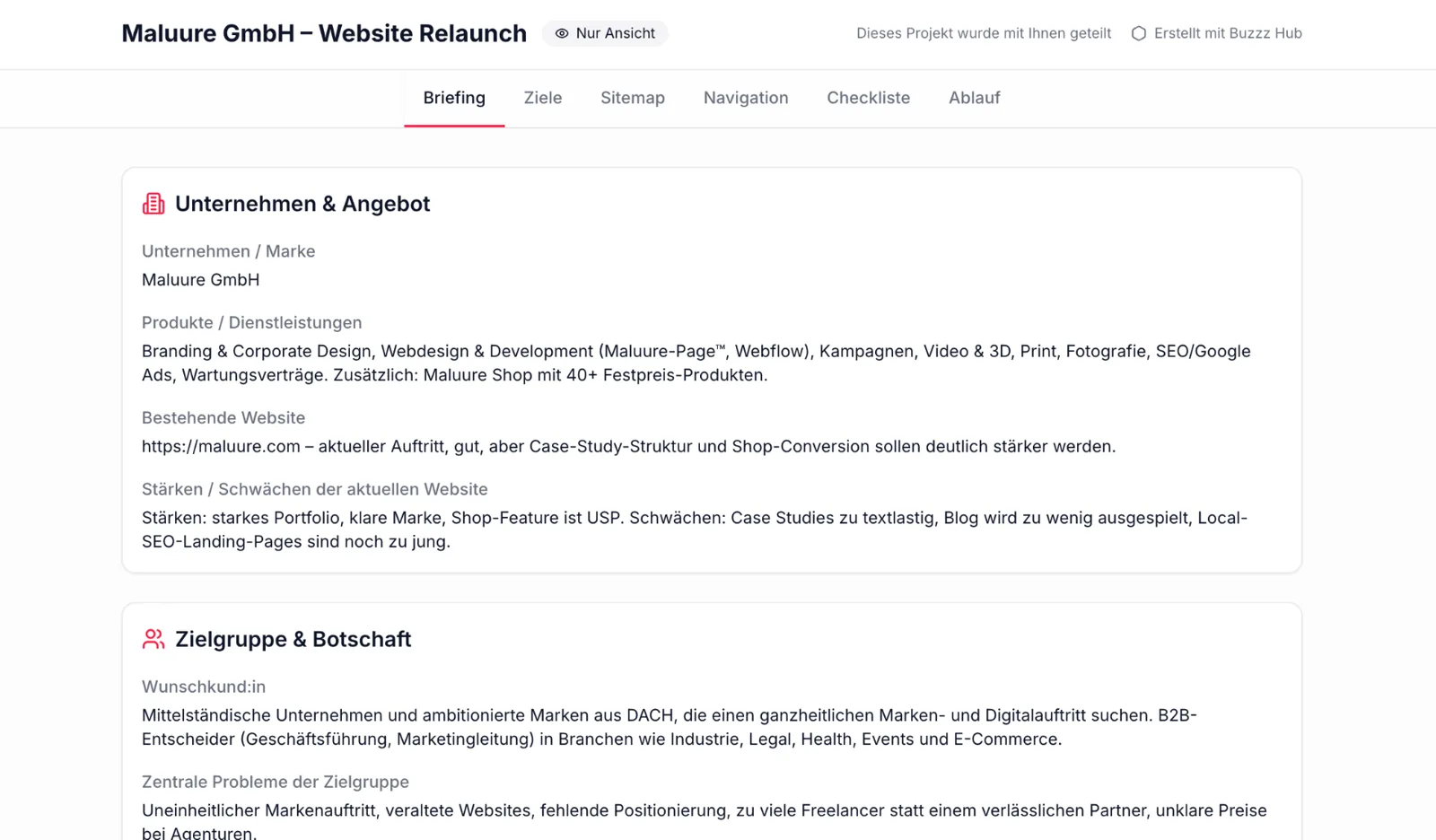
Company and offering
- What is the company or brand called, and what does it stand for?
- Which products or services does it offer?
- Is there already a website, and if so, what works and what does not?
Target audience and message
- Who is the primary target audience, and who are the ideal customers?
- Which three key problems or questions matter to this audience?
- What should visitors have understood after 10 seconds on the homepage?
- Why should someone choose this offering rather than a competitor's?
- Which objections or uncertainties typically arise before an enquiry?
- What specific action should visitors take at the end of the page?
- Which direct competitors should the brand distinguish itself from visually and through its content?
Look, impact and tone of voice
- Which two to five websites do you like, and why exactly?
- Which one to three websites do you dislike, and why?
- Which qualities should dominate: editorial, warm, minimal, high-end, playful, bold, soft, modern tech or organic?
- Which five terms describe the look and impact in your own words?
- How should the website speak: factually, personally, directly, poetically?
Content, assets and requirements
- What content, copy, images or videos are already available?
- Are new professional photos or videos needed?
- Is there a corporate visual identity or style guide?
- Are there any desired features, technical requirements or systems that need to be integrated?
Step 2: Developing a website strategy – how do we define measurable goals?
- Goal: Attract and convince customers in the luxury segment. Action: High-quality, understated design with generous white space, a calm rhythm and editorial typography.
- Goal: Sell tickets for an event. Action: A ticket button permanently visible in the navigation, plus a promotional banner during early-bird periods.
- Goal: Generate enquiries from medium-sized businesses. Action: Clear CTA boxes at the end of every service page and a contact form with no more than five fields.
- Goal: Increase applications for open positions. Action: A dedicated careers page with team portraits, benefits and a clearly visible quick application form.
- Goal: Build trust with new customers. Action: Case studies with real figures, testimonials with full names and portraits, and logos of well-known clients.
- Goal: Reduce support enquiries. Action: A prominent FAQ section, a searchable knowledge base and self-explanatory pricing tables.
A website without defined goals is a business card on the internet. A website with clear goals is a tool. The difference is not made in the layout, but in the hour before it.
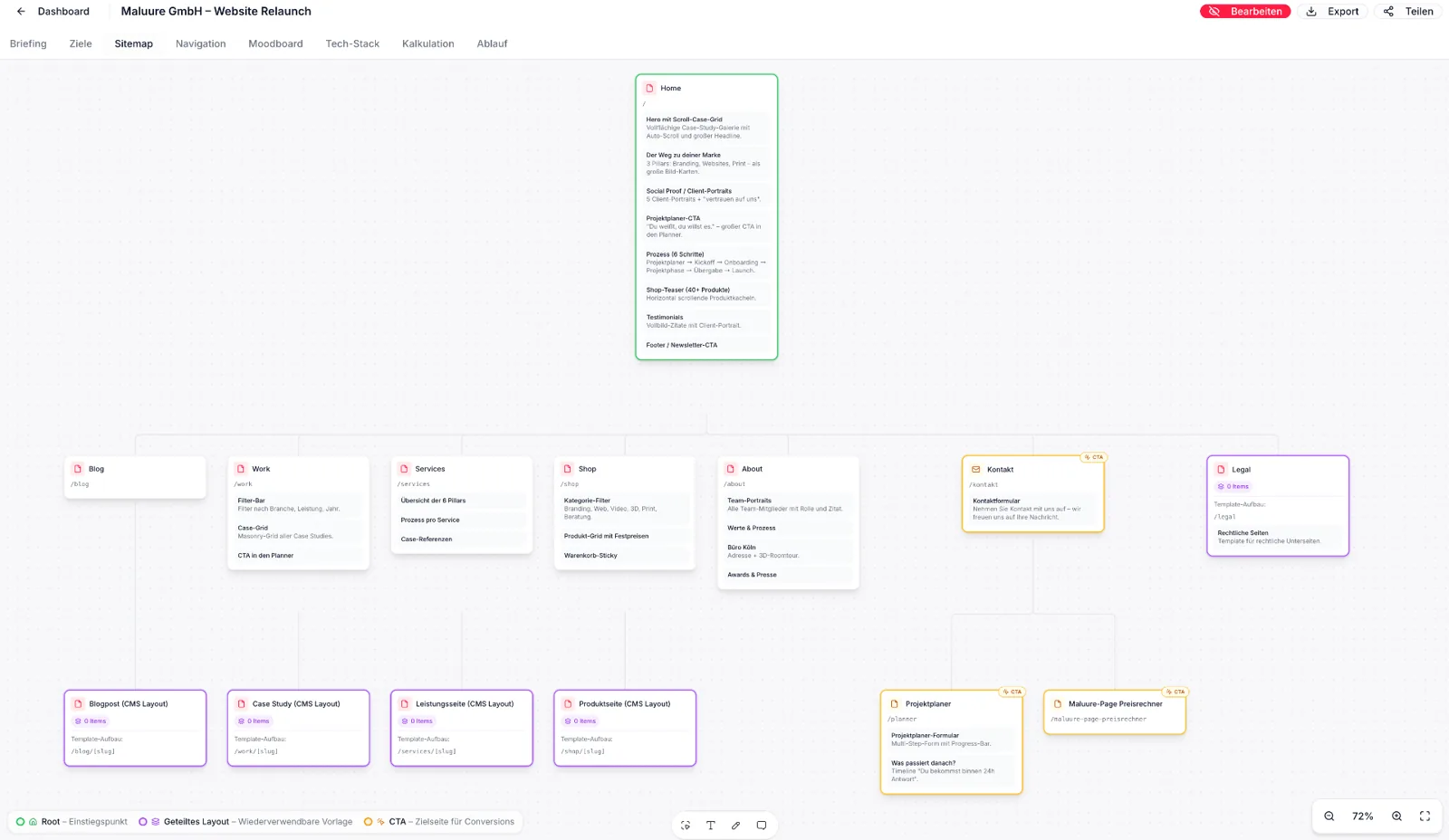
Step 3: How is a website sitemap created?
- Which pages does the website actually need, and which are being requested out of habit?
- How are these pages connected, and which paths should visitors take?
- Which dynamic pages are there, such as blog posts, case studies, products or locations?
- Which page is the main conversion point, and how do all paths lead there?
Step 4: How do we plan the navigation?
- Which items belong in the main navigation, and which stay at sub-menu or footer level?
- Does the site need a mega menu with previews, classic dropdowns or a flat structure?
- Where does the primary CTA sit, and is it permanently visible or dependent on scrolling?
- How does the navigation behave on mobile: sticky or standard, with a full-screen overlay or an off-canvas menu?
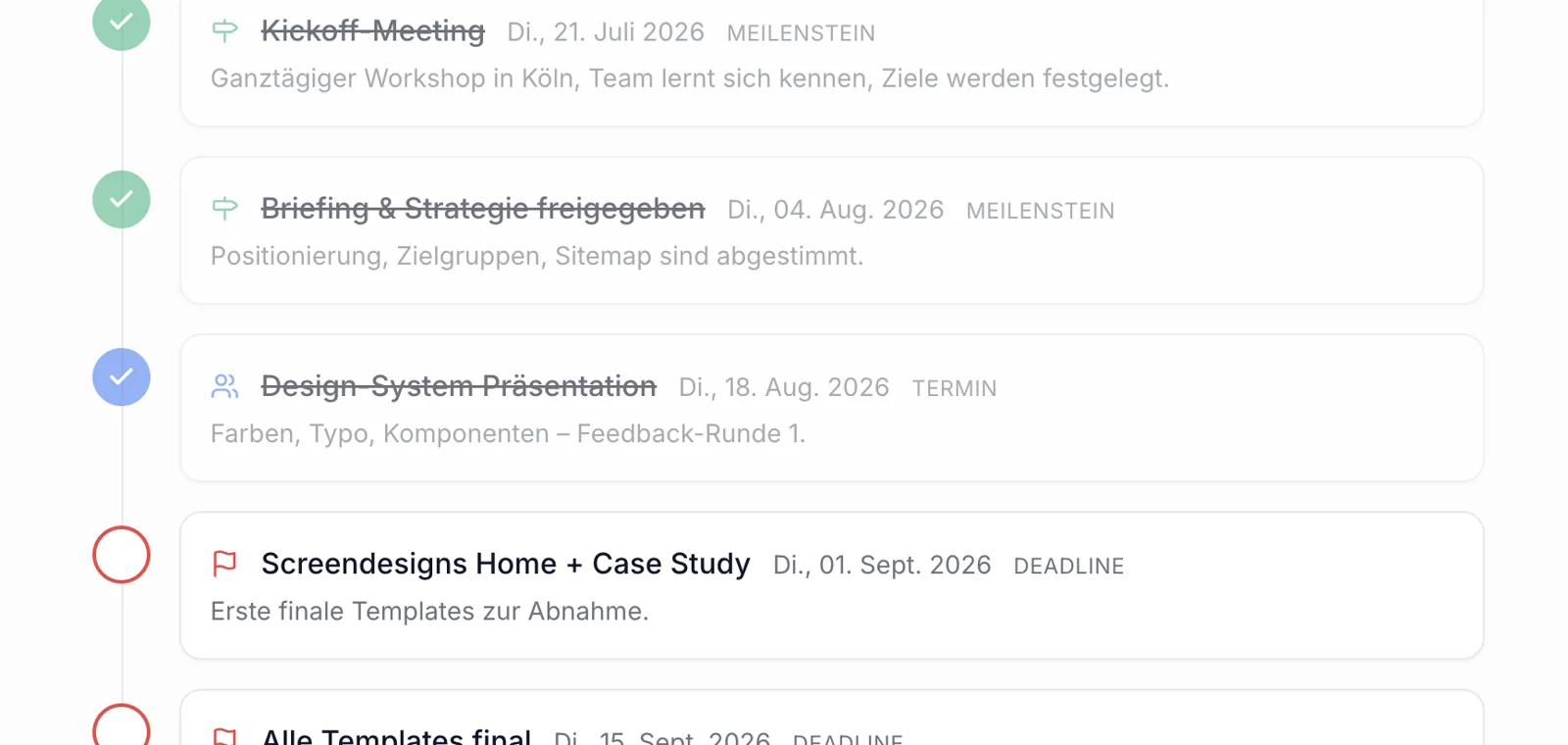
Step 5: Planning a website – process, timeline and responsibilities
- Review and organise assets: logos, fonts, existing photos, videos.
- Produce content: new photos or videos, plan shoots, finalise copy.
- Collect access details: domain, hosting, analytics, social accounts.
- Prepare legal information: legal notice, privacy policy, terms and conditions, consent plan.
- Clarify internal approvals: who in the team makes decisions on design, copy and launch.
- Confirm external dependencies: translators, photographers, tax advisers for the legal notice.
Website concept template: A checklist to copy
| Chapter | Content | Who provides it |
|---|---|---|
| 1. Starting point | Brand, offering, competition, current website | Client + agency |
| 2. Target audiences | Primary and secondary audiences, needs | Client |
| 3. Goals & KPIs | 3–6 goals with measurable metrics | Together |
| 4. Look & tone of voice | Mood board, references, things to avoid | Together |
| 5. Sitemap | All pages, hierarchy, conversion point | Agency |
| 6. Navigation | Main navigation, sub-navigation, footer, mobile behaviour | Agency |
| 7. Content plan | Per page: sections, copy length, media | Together |
| 8. Technology & SEO | CMS, integrations, URL structure, redirects | Agency |
| 9. Timeline | Milestones, approvals, launch date | Together |
| 10. Roles | Who decides what, who provides what | Together |
Common mistakes in website concepts
- Jumping into design too early. Colours and fonts are discussed before the target audience and goals are clear.
- Goals without metrics. “More customers" is not a goal. “30 qualified enquiries per month" is.
- Adding every requested page to the sitemap. Pages that serve no goal dilute the impact of the important ones.
- Treating navigation as an afterthought. If you leave navigation decisions until the design phase, you will rebuild it three times later.
- Underestimating content work. Copy, photos and videos do not create themselves – without a content plan, every launch is delayed.
- No point of contact on the client side. Without clear decision-making authority, every approval becomes a bottleneck.
We have never seen a project fail because of too much planning. But we have seen many fail because of too little.
How long does a website concept take?
- Week 1: Kick-off, briefing, goal setting.
- Week 2: Sitemap, navigation, initial content sections.
- Week 3: Refinement, approval, handover to design.
What only happens after the strategy process?
Conclusion: Why the groundwork always pays off
Related reading
- Commissioning a website – prices 2026 (with calculator): Get a transparent estimate of your project budget.
- Service: Branding: How to create a brand that underpins the concept.
- Service: Print: Translate the concept consistently into a printed experience.
FAQ: Creating a website concept
Frequently asked questions
What is a website concept?+
How do I create a website concept step by step?+
What belongs in a professional website concept?+
How much does a website concept cost?+
How long does a website concept take?+
Does a small website need a concept too?+
What is the difference between a website concept and a website strategy?+
How does a website briefing differ from a questionnaire?+
Is there a template for a website concept?+
What are common mistakes in a website concept?+
Is there a live example of your onboarding tool?+
Sources
- Nielsen Norman Group: Information Architecture Basics, Nielsen Norman Group (2022)
- Google Search Central: Site Structure Guidelines, Google (2024)
- Standish Group CHAOS Report – Projekterfolg durch klare Anforderungen, Standish Group (2020)
Want to see our articles more often in Google's Top Stories? Add Maluure as a preferred source.
Add on Google
Josef leads the strategic and creative development of brands at Maluure. For over a decade, he has guided medium-sized businesses from brand positioning to digital delivery.
Managing Director of Maluure GmbH, Cologne. Specialising in corporate design, brand strategy and digital brand experiences.
Weiterlesen

Website for Electricians: The Right Jobs and New Skilled Staff
Service pages, service area, references and careers: how to build an electrician website that brings preferred jobs and applications.

Website for Hotels: More Direct Bookings, Less Commission
Rooms, booking widget, location and direct benefits: how to build a hotel website that brings guests back from platforms to your own site.

Website for Physiotherapy: More Appointments and Applications
Treatments, appointment requests, team and careers: how to build a physio website that convinces patients and therapists alike.
Explore more blog topics

Website for Restaurants & Hospitality: What Guests Really Look For
Menu, opening hours, reservations: how to build a restaurant website that convinces guests in seconds and gets found locally.

A Website for Dental Practices: What Really Matters in 2026
Which content a dental website needs, how local SEO brings inquiries, and what a practice website really costs.

Willi on the DNA Insider Podcast: Marketing Needs Clear Prices
Willi was a guest on the DNA Insider Podcast by the Deutscher Netzwerk Award. Eleven minutes on clear pricing, founding Maluure with his brother Josef, and why networking is no buzzword for us.